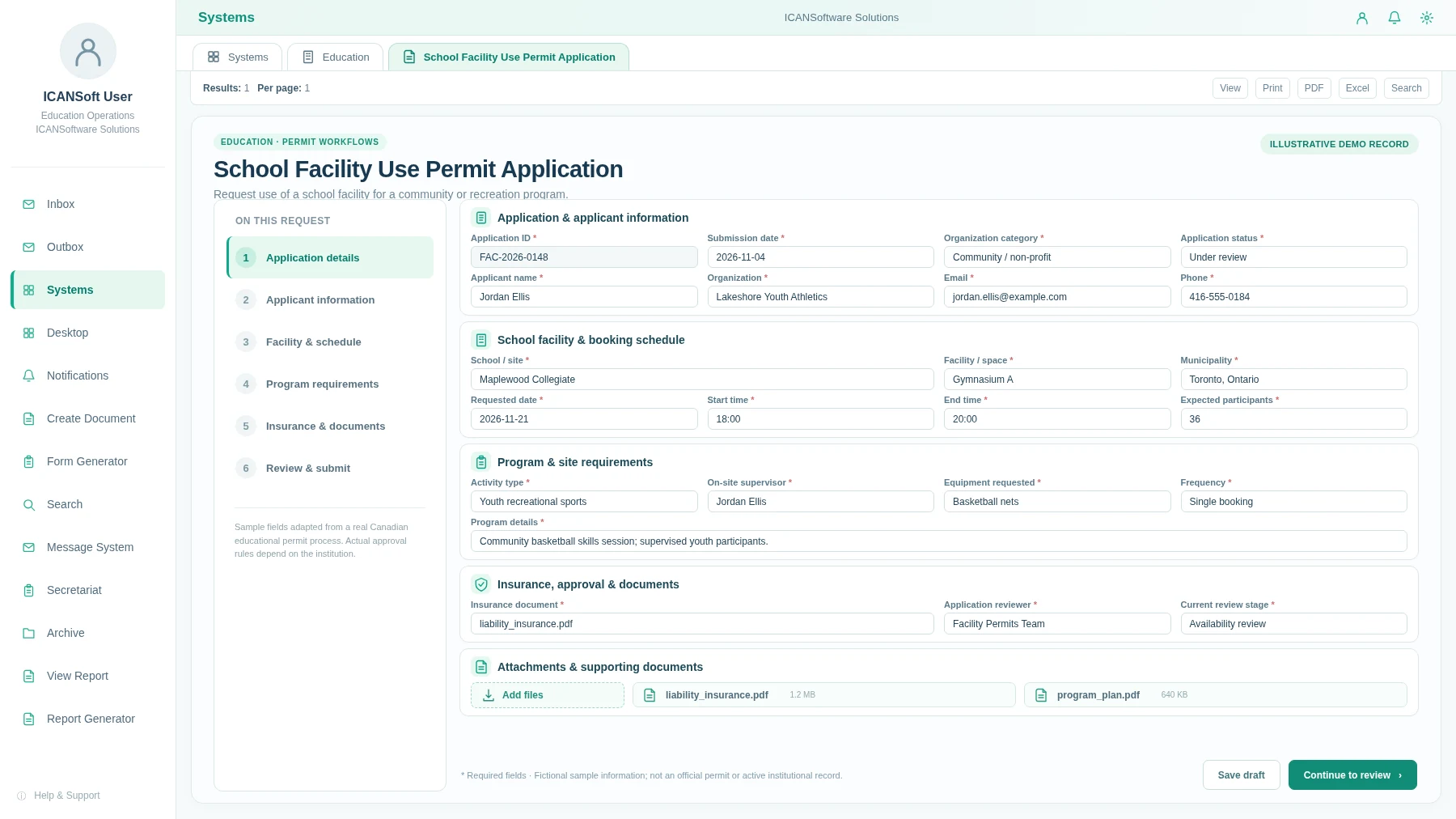
Requests move between teams
A facility booking may involve school administration, scheduling and insurance review. Without a shared record, it is hard to tell who needs to act next.

From school facility bookings and residence parking permits to student filming requests, important decisions often involve several teams. ICANSoft helps collect the right details, route each review and keep a clear record of the outcome.

A school booking may need a facilities review, insurance documents and a final decision. A campus permit may involve student services, residence staff and parking operations. When each team uses a different inbox, it becomes harder to see what is missing and what should happen next.
Case FAC-2026-0148 · Coordinated across school teams
A facility booking may involve school administration, scheduling and insurance review. Without a shared record, it is hard to tell who needs to act next.
Forms, proof of insurance, safety plans and parking information can end up in different inboxes instead of alongside the application they belong to.
Staff need to answer what is approved, what is waiting and which dates are approaching without rebuilding a report from spreadsheets.
Give each request a clear path from intake to decision, attach the right records and make follow-up easier for schools and campus departments.
Receive community and after-hours facility applications, check dates and school availability, request insurance evidence and document the authorization.
Capture resident and vehicle details, verify eligibility, review lot availability and keep the resulting parking decision in one case.
Coordinate requests to film on campus, with location approvals, schedule reviews, equipment or safety conditions and a record of the decision.
Route school or campus activity proposals through staff, facilities and security checks, with the relevant plans and permissions attached.
Collect classroom, residence or campus facility issues, assign work to the right team and monitor open items and completion notes.
Give departments a consistent way to request shared spaces, equipment or services, document approvals and report on usage.
An application for after-hours school space can be reviewed for availability, program requirements and insurance before an authorized staff member confirms the outcome.
Community gymnasium booking
Use three connected capabilities to collect school and campus requests, coordinate reviews and see which items need attention.
Configure digital applications for facility bookings, student filming, parking permits and shared resources with ICANSoft BPMS. Capture the details and supporting documents each reviewer needs.
Build reports from captured form and workflow data. Review application counts, approval status, upcoming booking dates and outstanding tasks across departments.
Configure routing, staff assignments, review steps, notifications and decisions across education teams. Consider application integration where approved and feasible.
A focused workflow gives the team a chance to document existing work, test the approach and measure whether the process has improved.
Identify how a request starts, who reviews it, which forms or bylaws matter and where information is currently stored.
Output: current-state process map and scope.Define future-state steps, responsibilities, required fields, exception handling and when staff approval is needed.
Output: agreed workflow design.Set up digital intake, task assignments, notifications, routing rules and process tracking against the approved design.
Output: a configured workflow for testing.Assess approved interfaces and use application integration to exchange the information needed between workflow and existing applications, where feasible.
Output: tested integration points and controls.Train users, review outstanding requests and monitor useful measures such as time awaiting review or overdue work.
Output: operational process and baseline measures.Use staff feedback and process data to refine bottlenecks. Decide which additional services would benefit from a similar approach.
Output: prioritized improvement plan.A school or post-secondary institution needs clear roles, privacy boundaries and consistent records. Those decisions should shape the workflow from the start.
Determine which personal information a workflow needs, who may see it, and the institution’s privacy, retention and access requirements before configuration.
Keep decisions with designated staff. Define how insurance, supervision, location access, safeguarding and other applicable checks are handled.
Review possible links to student information, room scheduling, facility, document and parking systems only where approved interfaces and permissions allow.
Associate each request with its documents, decisions and follow-up tasks. Confirm accessibility expectations, procurement steps and operational ownership.
A few practical things to clarify before choosing a workflow to improve.
Potentially. ICANSoft has workflow and application-integration capabilities, but specific links to student information, scheduling, parking or facilities systems depend on interfaces, permissions, security reviews and agreed scope.
Yes. A facility booking or parking permit is a practical starting point. The team can configure the intake form, reviewers, decisions and reports before evaluating wider use.
Each workflow can reflect the institution’s roles and delegated authority. Staff remain responsible for actual permit, safety, eligibility and access decisions; automation helps route and record their work.
Forms, categories, required documents, approval paths and reporting views can be configured for the process. Specific changes and rollout arrangements are agreed during discovery.
Start by mapping the information collected, access permissions, storage expectations and applicable institutional policies or Canadian privacy requirements. These are deployment decisions to confirm, not assumptions about existing compliance.
Tell us where facility requests, approvals, student services or campus coordination tend to slow down. We can discuss the workflow, the teams involved and a sensible place to begin.
Contact Us